Rob Run Player ESP, Glow, and Chams Features
A feature-focused guide to Rob Run player ESP, from boxes and skeletons to role tags, action states, off-screen arrows, glow, and chams.
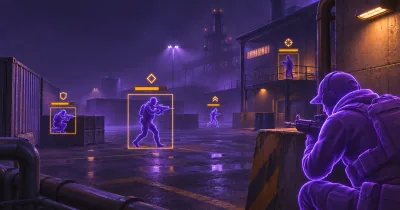
Rob Run player ESP is the main visual feature group for player information. The supplied list includes player boxes, skeleton, health and armor readouts, names, clan tags, role tags, action states, vehicle occupancy, snaplines, off-screen arrows, and several filters. Glow and chams are listed as a separate group with their own controls.
Player ESP display options
The product summary lists Enable Player ESP and ESP Style with Plain and Background choices. Box options include Full, Corner, 2D, and 3D. Fill Box, Skeleton, and Head Circle are also included.
For player status information, the list includes Health Bar / Text, Armor / Shield Readout, Name / Alias, Clan Tag, Role Tag, Police Highlight [POL], Wanted / Heat State, and Held Weapon / Item.
These names show how the feature list is organized. Display options describe the visual presentation, while status options describe the information named in the list.
Action states and player context
Action States include Shooting, Running, Reloading, Arrested, and Downed. Vehicle Occupancy is listed separately. Snaplines, Out of Screen Arrows, and the Aiming At You Indicator are additional visual entries.
The summary also lists Visible / Hidden Colors, Fade with Distance, Max Player Distance, and Hide Team. NPC / Corpse Markers appear in the player visual group as well.
An article should keep these entries distinct. A reader searching for role tags is looking for a different part of the product than someone searching for action states, team hiding, or distance settings.
Glow and chams options
The separate Glow Options group includes Enable Glow / Chams and Glow Style choices: Outline, Fill, and Combined. Glow Color, Police Separate Color, Material Chams, and Max Glow Distance are also listed.
Because glow and chams have their own group, they should not be treated as synonyms for every player ESP option. The clearest product description names both groups and then keeps the listed controls under the correct heading.
Player ESP terms at a glance
| Group | Supplied options |
|---|---|
| Basic display | Plain, Background, Full, Corner, 2D, 3D |
| Player information | Health, armor, name, clan, role, wanted or heat state |
| State indicators | Shooting, running, reloading, arrested, downed |
| Position cues | Snaplines, off-screen arrows, aiming at you indicator |
| Filters | Visible / hidden colors, fade with distance, max distance, hide team |
| Glow and chams | Outline, Fill, Combined, glow colors, material chams |
See the Rob Run player ESP features for the full product wording. The related guide to Rob Run loot and world markers covers non-player visual groups.